- Dec 04 Tue 2012 14:01
-
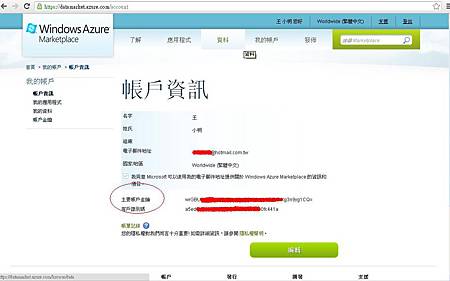
【PHP】Google、Yahoo、Bing Web Search API
- Oct 21 Fri 2011 10:47
-
Proftpd + MySQL authentication + Quotas
proftpd-1.3.0
=> ./configure --prefix=/usr/local/proftpd --with-modules=mod_sql:mod_sql_mysql:mod_quotatab:mod_quotatab_sql --with-includes=/usr/local/mysql/include --with-libraries=/usr/local/mysql/lib
mv /usr/sbin/proftpd /usr/sbin/proftpd.rpmsave
ln -s /usr/local/sbin/proftpd /usr/sbin/proftpd
=> ./configure --prefix=/usr/local/proftpd --with-modules=mod_sql:mod_sql_mysql:mod_quotatab:mod_quotatab_sql --with-includes=/usr/local/mysql/include --with-libraries=/usr/local/mysql/lib
mv /usr/sbin/proftpd /usr/sbin/proftpd.rpmsave
ln -s /usr/local/sbin/proftpd /usr/sbin/proftpd
- Oct 21 Fri 2011 10:45
-
VirtualBox By Linux + no-ip

之前遇到一個瓶頸, 希望有自己寫程式的測試機. 但又不可能在家用一台 Server (口袋沒有麥可!!)..
有時寫 code 時. 習慣用 vi 來寫code 的我.. 用 UltraEdit 來寫.. 真的是十分不方便
(雖說 UltraEdit 功能很強大, 可能是寫的 FU 不對吧.... )
只好用自己的筆電. 灌上 VirtualBox.. 然而我的用意是. 可以對外連線.. 爬了一些文..
終於知道如何設定 ... 真是太感動了
安裝步驟
- Oct 13 Thu 2011 14:37
-
Sphinx + Mmseg (分詞)
今天在寫公司的code 時. 突然發現!! 原來我沒有把 Sphinx 的相關文件留存下來耶!!
所以就補一下文件
Sphinx: 目前來看 以php 來說. 做全文檢索 效能是不錯的.. 之前有用 lucene 的 solr + 庖丁解牛 (很帥的名字吧)
所以就補一下文件
Sphinx: 目前來看 以php 來說. 做全文檢索 效能是不錯的.. 之前有用 lucene 的 solr + 庖丁解牛 (很帥的名字吧)
- Jul 05 Tue 2011 14:26
-
Jquery Uploadify 之 IO error

好像很象沒有寫一些文章. 最近在寫所謂的 爬文程式.. 四處去爬別人的文章.. 而且還要限時寫完.. 搞的超久的
最近公司也給我一個新的案子. 然而有用到 jquery.uploadify . (http://www.uploadify.com/)
然而遇到了一個問題. 在 upload 時. 一直出現 IO Error .. 搞了老半天.. folder 的目錄權限也有設. 但卻一直不行
後來終於找到問題. 原來是 apache 的問題呀. 若有用 jquery.uploadify 的朋友們!!
- Apr 21 Thu 2011 16:58
-
Red Hat EL5 Yum Install

之前有發佈過 EL4 但自從有了 EL5 後. 就沒有裝 EL4 的 server 嘍!! 真是太 「ㄏ一ㄥˋ 新」了
安裝的元件如下:
libxml2-2.6.26-2.1.2.8.i386.rpm
libxml2-python-2.6.26-2.1.2.8.i386.rpm
m2crypto-0.16-6.el5.6.i386.rpm
readline-5.1-3.el5.i386.rpm
- Apr 08 Fri 2011 11:03
-
Yahoo Connect

【Authentication and Authorization with Yahoo】- Authorization with OAuth
用到最後!! 覺得 Yahoo 的 API 好像滿多問題的內!! 跟 Google Apis 比較起來!! Google 的文件寫的清楚多了
- Apr 08 Fri 2011 11:03
-
Google Oauth2
【Authentication and Authorization for Google APIs】- Using OAuth 2.0 to Access Google APIs
一開始在看 Google apis 時,還真的有些搞不懂。 但 Google 寫的文件,還真的都滿清楚的。
- Apr 08 Fri 2011 11:03
-
Facebook Connect

- Mar 02 Wed 2011 12:17
-
MongoDB Part Ⅲ
Coding By PHP
自己本身是寫 PHP 的,當然要使用 MongoDB 也是使用 PHP 嘍。
PHP Lib 下載: http://www.mongodb.org/display/DOCS/PHP+Libraries,+Frameworks,+and+Tools
之前從 Smarty 改用 Codeigniter 之後, Coding 就一直是用 Codeigniter (CI)。
自己本身是寫 PHP 的,當然要使用 MongoDB 也是使用 PHP 嘍。
PHP Lib 下載: http://www.mongodb.org/display/DOCS/PHP+Libraries,+Frameworks,+and+Tools
之前從 Smarty 改用 Codeigniter 之後, Coding 就一直是用 Codeigniter (CI)。
- Mar 02 Wed 2011 09:38
-
MongoDB Part Ⅱ
PHP load Mongodb Driver
mongodb-mongo-php-driver-1.1.4-3-gdb58b36.tar.gz
=> /usr/local/php5/bin/phpize
=> ./configure --with-php-config=/usr/local/php5/bin/php-config
mongodb-mongo-php-driver-1.1.4-3-gdb58b36.tar.gz
=> /usr/local/php5/bin/phpize
=> ./configure --with-php-config=/usr/local/php5/bin/php-config
- Mar 01 Tue 2011 15:06
-
MongoDB Part Ⅰ
之前聽一個離職同事有介紹到 mongoDB, 但一直沒有時間去玩它。
MongoDB 是屬於 NoSQL,還有人稱之為 非聯連式資料庫
上網查了一下 MongoDB 的相關資料,自己也玩了一下。
個人覺得正如網站上講的 MongoDB 真是有很高的擴展性
MongoDB 是屬於 NoSQL,還有人稱之為 非聯連式資料庫
上網查了一下 MongoDB 的相關資料,自己也玩了一下。
個人覺得正如網站上講的 MongoDB 真是有很高的擴展性